1. The problem starts before the supplier sends an email
A procurement manager at a manufacturing company issues 150 purchase orders to suppliers across multiple regions. Within a few days, the procurement inbox starts filling up. One supplier confirms an order but changes the delivery date. Another requests a price revision. A third sends a revised quantity in a PDF attachment, while several suppliers have not confirmed their purchase orders at all.
The procurement team must identify which purchase order each email refers to, verify the requested changes, update the relevant records and inform production or inventory teams if delivery commitments are affected.
This is the kind of repetitive work that Microsoft's Supplier Communications Agent, part of the Procurement Agent in Dynamics 365 Supply Chain Management, is designed to reduce.
The agent uses AI to analyse incoming supplier emails, identify purchase order references, recognise confirmations and change requests, and extract information such as revised quantities, prices and delivery dates. It can also prepare follow-up emails for unconfirmed or delayed purchase orders.
However, introducing this capability raises an important question: can the existing Dynamics 365 environment reliably identify the supplier, match the communication to the correct purchase order and interpret the information being exchanged?
If supplier records contain outdated email addresses, purchase orders use inconsistent units of measure, or delivery commitments are not maintained accurately, automation becomes more difficult to manage. This makes master data preparation an important part of implementing supplier communication automation in Dynamics 365.
2. Understanding the Supplier Communications Agent in Dynamics 365
The Supplier Communications Agent is a capability within Microsoft's Procurement Agent for Dynamics 365 Supply Chain Management. It uses AI to process routine supplier communications and reduce the manual effort involved in managing purchase order confirmations, revisions and follow-ups.
Supplier communication traditionally depends on email exchanges between buyers and vendors. Even organisations using electronic data interchange (EDI) for regular transactions may still receive important updates through email, particularly when suppliers need to explain delays, request changes or provide supporting documents.
The Procurement Agent addresses this gap by connecting supplier communication with purchasing records in Dynamics 365.
2.1 Inbound supplier communication
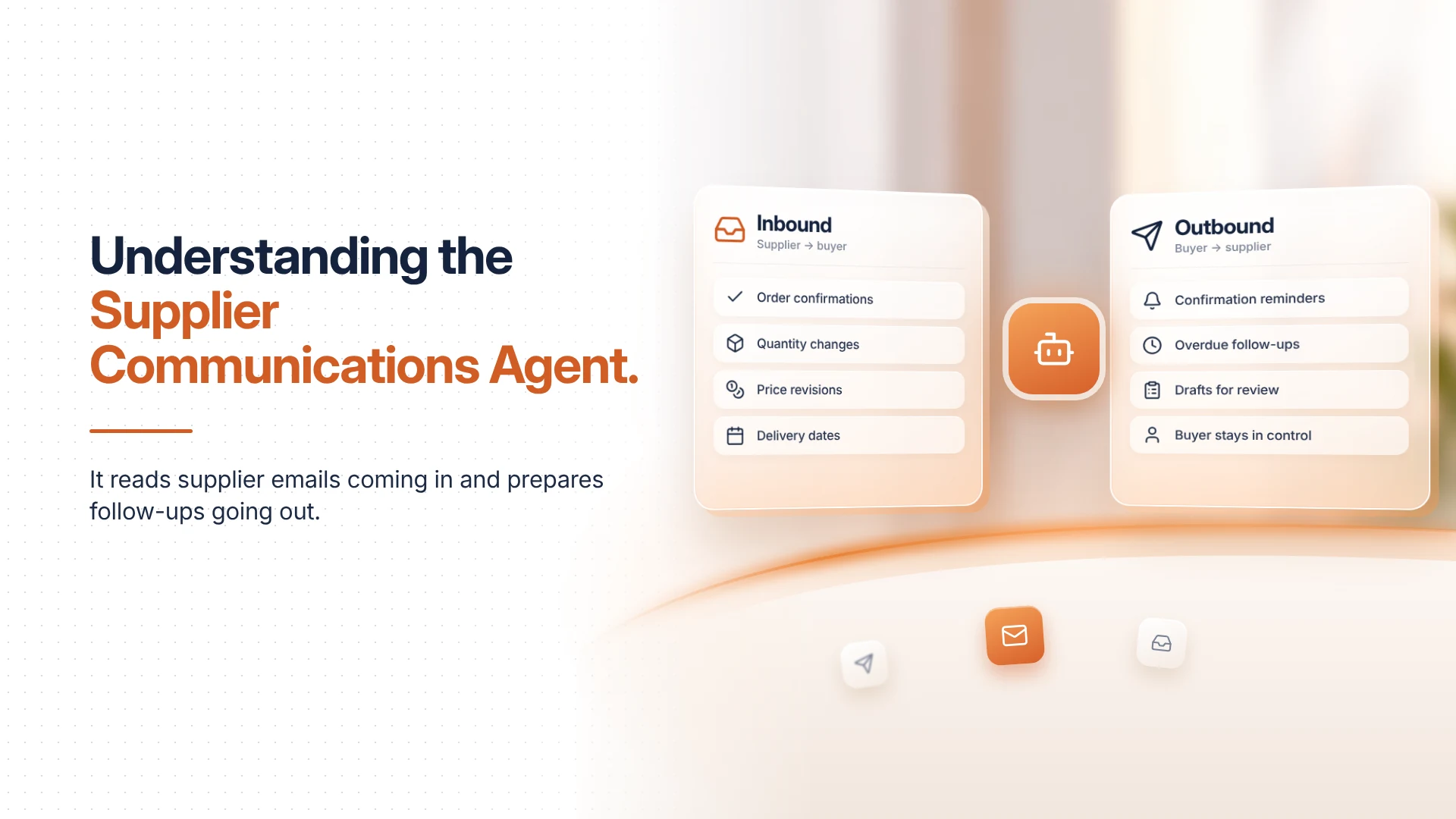
The agent can analyse incoming supplier emails and determine their procurement context. It identifies whether a message relates to a purchase order confirmation, a quantity adjustment, a price revision, a cancellation or a change in delivery commitment.
For example, when a supplier requests an increase in the ordered quantity, the agent can identify the purchase order reference, locate the relevant information and present the proposed change to the procurement team.
It can also interpret delivery information when suppliers provide an estimated shipping date instead of a warehouse arrival date. Using relevant transit-time assumptions, the agent can help determine the expected arrival date.
This reduces the need for buyers to manually search through email threads and compare every supplier response against the original purchase order.
2.2 Outbound supplier communication
The agent also supports communication initiated by the procurement team.
When a supplier has not confirmed a purchase order within a defined period, the agent can identify the outstanding confirmation and prepare a reminder. Similarly, when a delivery is overdue, it can generate a follow-up requesting an updated delivery commitment.
Depending on the configuration, these emails can be saved as drafts for human review or sent automatically.
The objective is not to remove procurement oversight. It is to reduce the time spent identifying routine communication requirements and preparing responses.
Microsoft also provides an Impact Analysis capability within the broader Procurement Agent. When enabled, it evaluates how supplier-requested changes could affect inventory, production schedules and customer deliveries. This helps buyers assess the operational consequences before accepting a change.
3. Why supplier master data is the first thing to address
Supplier master data is the structured information that identifies a vendor and defines how the organisation conducts business with that vendor.
In Dynamics 365 Supply Chain Management, supplier records are maintained through vendor accounts and related procurement and financial configurations. Depending on the business structure, supplier information may also be maintained across multiple legal entities.
For the Supplier Communications Agent, this information provides the context needed to interpret supplier messages and connect them with purchasing transactions.
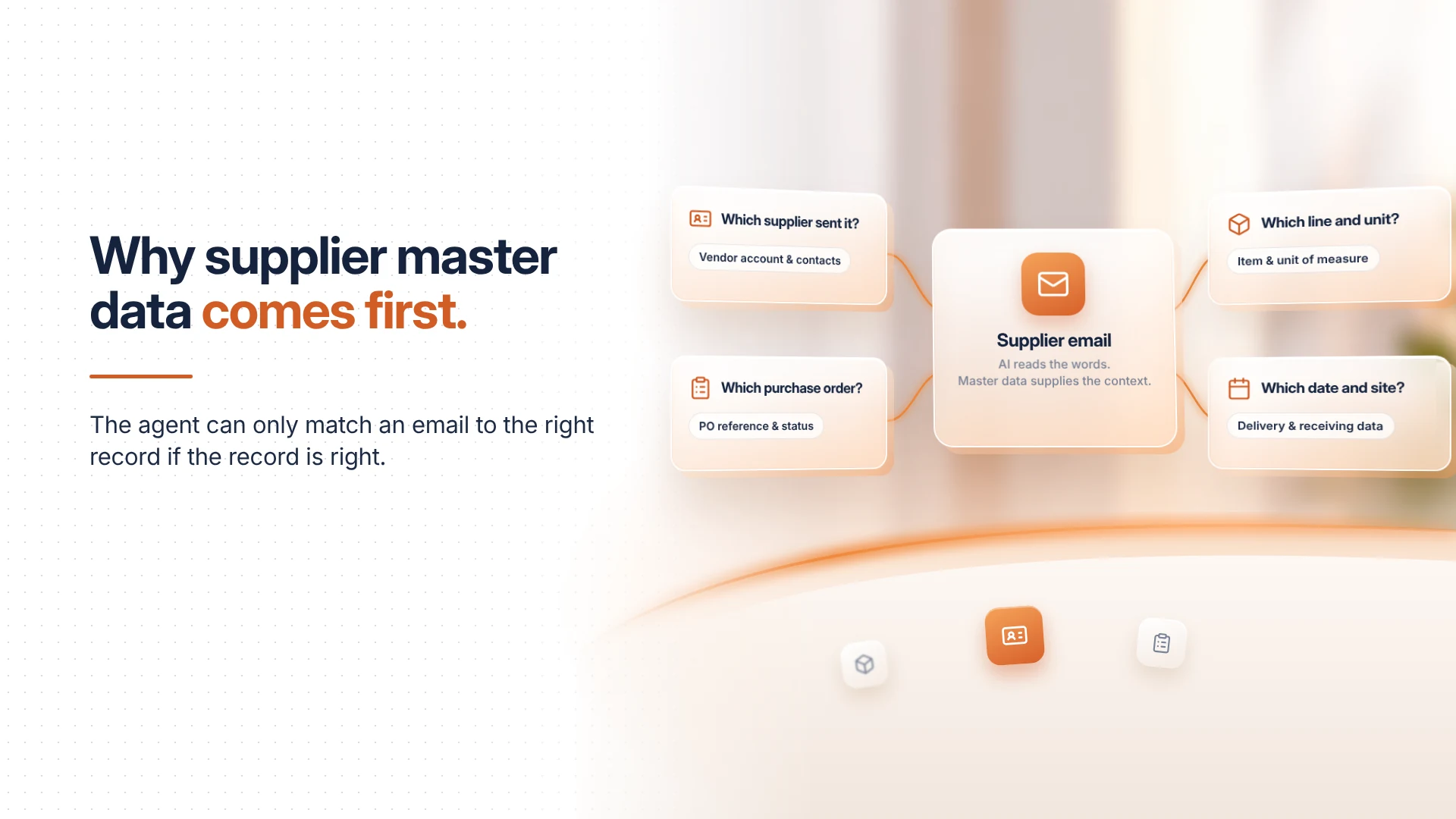
Consider a supplier who sends an email requesting a delivery-date revision. For the agent to process this request correctly, the system needs to establish which supplier sent the email, which purchase order the message concerns, which purchase order line is being changed, what the original commitment was and what the supplier is proposing instead.
These questions depend on more than AI's ability to interpret natural language. They also depend on the quality and consistency of the underlying business records.
A useful implementation approach is to review the following master data areas before enabling automated supplier communication.
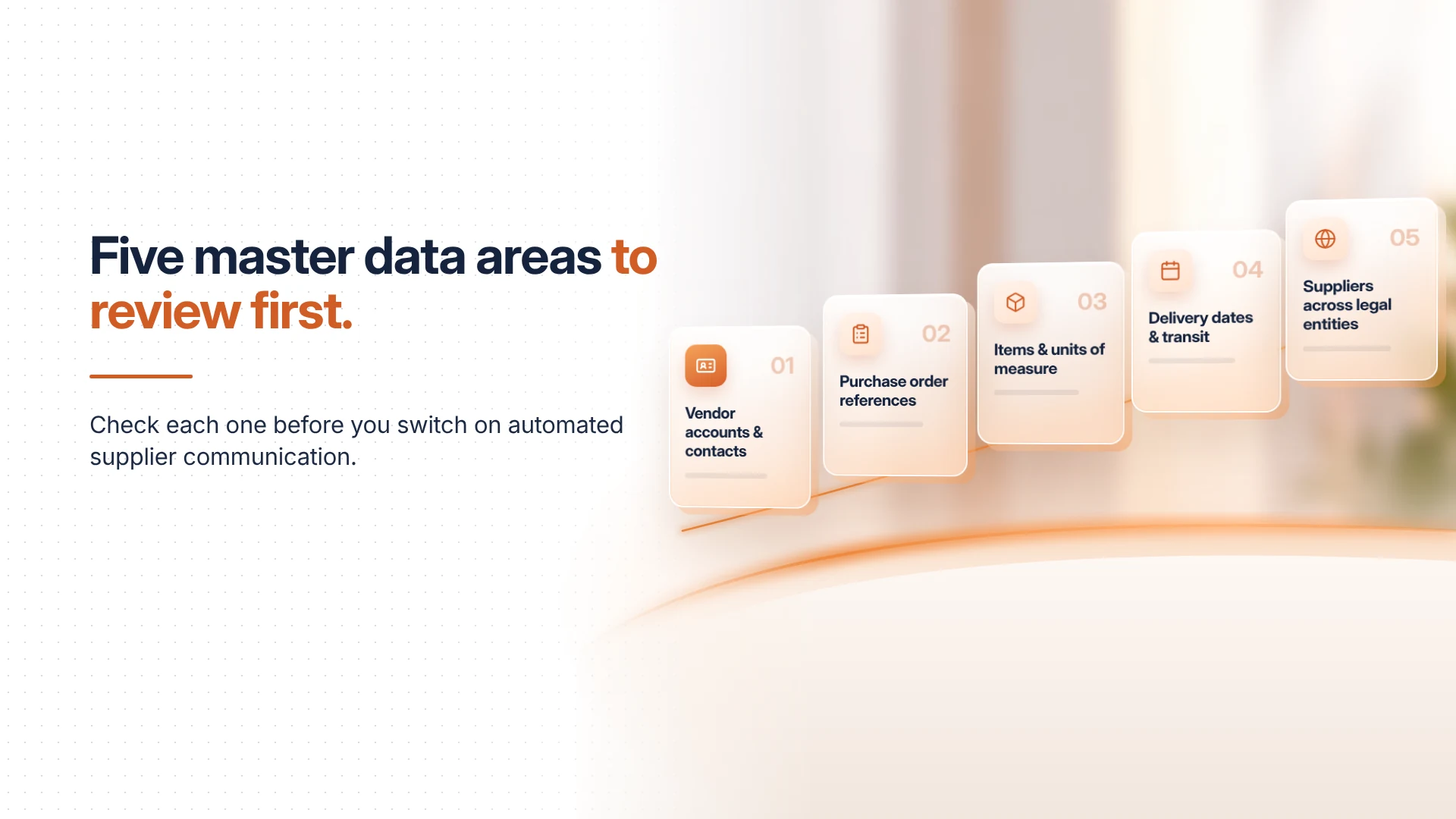
4. Five master data areas to review before enabling the agent
4.1 Vendor account details and contact information
The vendor account is the starting point for supplier identification in Dynamics 365 Supply Chain Management. Each supplier should have a unique and correctly mapped vendor account, with updated registered names, addresses and contact details. Particular attention should be given to supplier email addresses, as these determine how procurement-related communication is managed.
Suppliers may have separate contacts for purchase order confirmations, delivery updates, invoice queries and general commercial communication. Maintaining these distinctions helps procurement teams direct messages to the appropriate contacts. Dynamics 365 supports multiple contact records against a vendor, with specific purposes assigned to each. For the Supplier Communications Agent, the Purchase Order Communications contact purpose is particularly relevant when configuring supplier follow-ups.
Vendor status and applicable holds should also be reviewed to ensure that inactive or restricted suppliers are not treated as regular procurement contacts. Organisations operating across multiple legal entities should check for duplicate vendor accounts and inconsistencies in supplier information between entities. These checks establish a reliable supplier record that the agent can use when processing incoming emails and preparing outbound communication.
4.2 Purchase order references and transaction accuracy
The Supplier Communications Agent works with purchase order information to identify supplier commitments and requested changes.
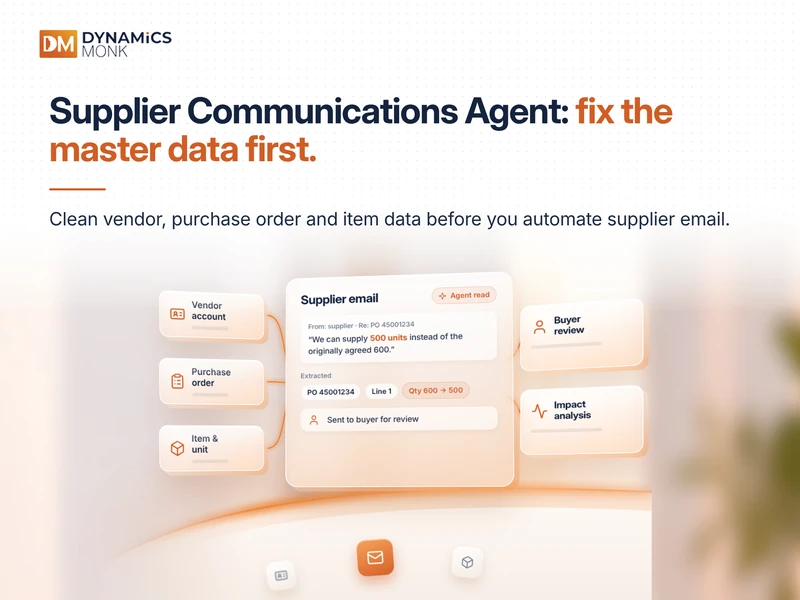
Consider a supplier sending the following response:
"Regarding PO 45001234, we can supply 500 units instead of the originally agreed 600. The remaining quantity will be available next week."
The agent needs to identify the relevant purchase order, locate the affected line and interpret the proposed quantity change. This becomes difficult when purchase order references are inconsistent across email threads, attachments and internal records.
Organisations should therefore review how purchase orders are created, communicated and maintained. Purchase order numbers must be shared accurately with suppliers, while line-level information should clearly identify the products, quantities and delivery commitments involved.
The status of each purchase order is equally important. Draft, approved, confirmed and revised orders represent different stages of the procurement process. Maintaining these distinctions helps buyers understand whether a supplier response relates to an active purchasing commitment.
Purchase order change management also requires attention. Dynamics 365 supports approval workflows for purchase order modifications, allowing organisations to define how changes are reviewed before they become part of an approved transaction.
For example, a supplier's request to increase a unit price should not automatically become an approved commercial change simply because the revised amount was extracted correctly. The procurement team must evaluate the request against contractual terms, purchasing policies and approval requirements before applying the change.
4.3 Item master data and units of measure
Unit-of-measure inconsistencies are a common source of confusion in procurement transactions.
Consider a purchase order that specifies 100 individual components. The supplier responds that it can deliver 10 boxes, with each box containing 10 components. The quantities are equivalent, but the supplier and buyer are expressing them differently.
For an automated communication process, this distinction matters. The system must interpret the supplier's response in the context of the purchasing unit and the item being ordered.
Dynamics 365 Supply Chain Management supports product-specific units of measure and unit conversions. The purchasing unit is typically derived from the released product's purchasing unit configuration, although it can be changed on an individual purchase order line.
The Supplier Communications Agent can recognise different unit representations, such as packs versus individual units, and identify the intended quantity change. However, this does not eliminate the need for accurate item master data.
Organisations should ensure that product and released product records are correctly identified, purchasing units are configured appropriately and conversion factors accurately reflect supplier packaging arrangements. Vendor-specific product references and descriptions should also be consistent with the information used in purchase orders and supplier correspondence.
For example, if a supplier sells an item in cartons of 12 but the purchasing unit is maintained as individual pieces, the conversion must accurately reflect that relationship. Incorrect conversion factors can create discrepancies between the supplier's commitment and the organisation's expected receipt quantity.
4.4 Delivery dates, transit assumptions and receiving locations
Supplier communication is not limited to quantities and prices. Delivery commitments are equally important because they influence inventory availability, production planning and customer fulfilment.
A supplier may provide an estimated shipping date rather than a confirmed warehouse delivery date. For example, the supplier might communicate an estimated time of departure (ETD) of 12 November, with an expected transit period of eight days. The procurement team needs to understand that the estimated time of arrival (ETA) would be 20 November, subject to the applicable transit assumptions.
The Procurement Agent can recognise shipping-date information and help derive an estimated arrival date using agreed transit-time assumptions. This makes delivery-related configuration important when preparing the Dynamics 365 environment.
Procurement and supply chain teams should ensure that requested and confirmed delivery dates are maintained accurately, vendor-specific lead times reflect actual supply arrangements and receiving site and warehouse information are correctly configured. Delivery calendars and working-day assumptions should also be considered when calculating expected arrival dates.
It is equally important to understand the current boundaries of the agent. For example, Microsoft's documentation identifies changing the delivery site for a specific purchase order line as an unsupported supplier communication scenario. A supplier requesting a different warehouse or receiving site therefore requires manual review rather than an assumed automated update.
This distinction is particularly relevant for organisations operating multiple warehouses or manufacturing locations, where a delivery change can affect inventory allocation and production schedules.
4.5 Supplier records across legal entities and vendor relationships
Organisations operating across multiple legal entities often maintain supplier relationships at different levels. A supplier may work with several business units, supply different product categories or operate through separate registered entities.
If supplier information is duplicated or maintained inconsistently, procurement teams may struggle to establish a consistent view of the relationship.
Dynamics 365 Supply Chain Management traditionally supports vendor records maintained within individual legal entities. Microsoft's newer Supplier Engagement capability introduces a more centralised approach to supplier onboarding and supplier information management across legal entities.
Announced in August 2026 as a public preview, Supplier Engagement introduces global vendor management, allowing organisations to maintain a shared supplier record across multiple legal entities. Supplier information, including contacts, addresses, certifications and organisational details, can be maintained centrally and shared where appropriate. Once qualified, suppliers can be released into one or more legal entities for operational transactions.
It is important not to confuse this capability with the Supplier Communications Agent. They address different parts of supplier management. Supplier Engagement focuses on supplier onboarding, lifecycle information and collaboration, while the Supplier Communications Agent focuses on purchase order-related email communication and follow-ups.
Together, they represent a broader direction towards connected supplier management in Dynamics 365.
5. How the Supplier Communications Agent uses this information
Once the master data and procurement configurations have been reviewed, organisations can assess how the agent fits into their purchasing workflow.
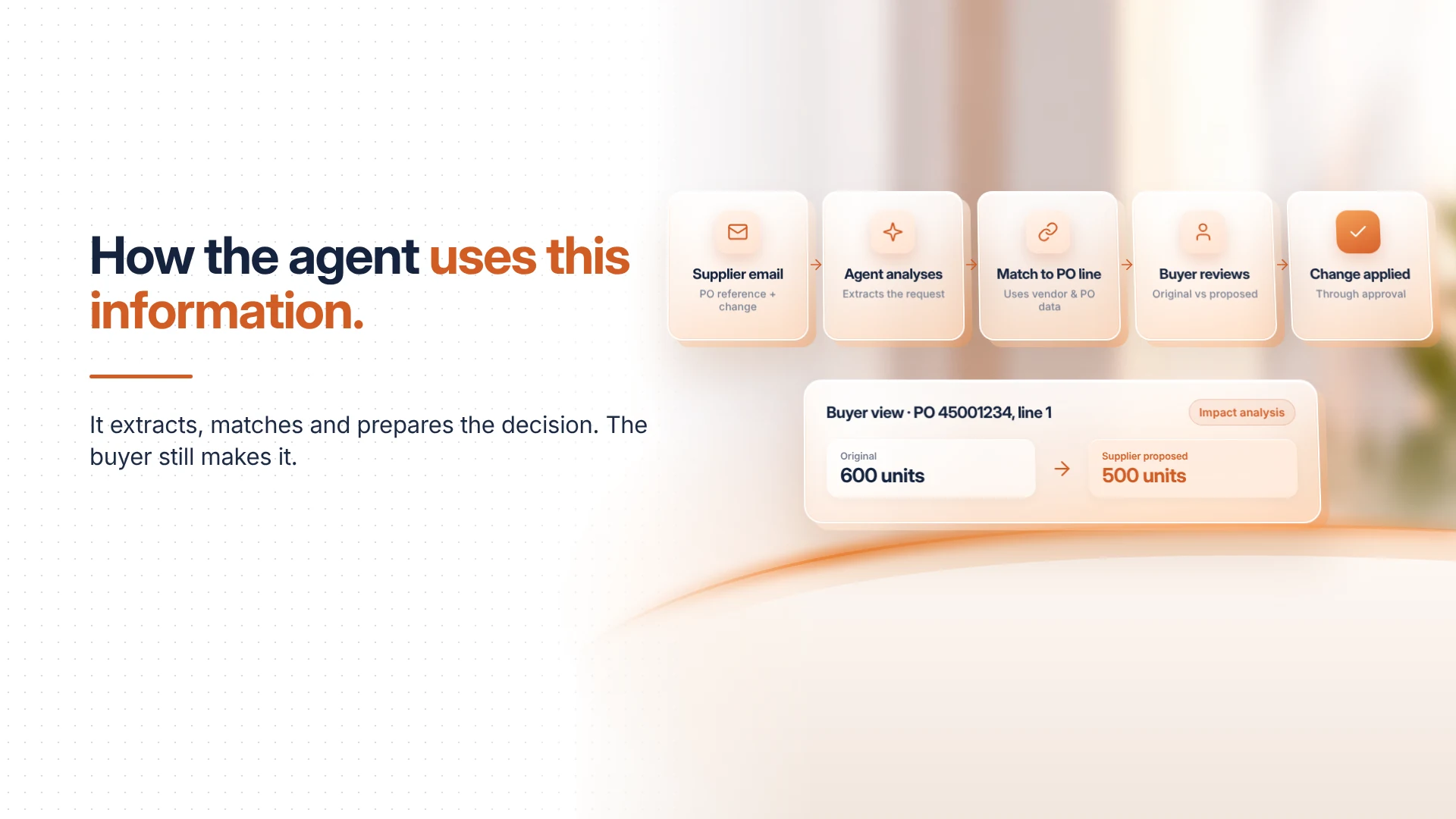
Consider a supplier requesting a change to an existing purchase order. The process begins when the supplier sends an email containing the relevant purchase order reference and the proposed change. The agent analyses the message, identifies its procurement context and extracts the relevant information.
It then uses the available supplier and purchase order information to match the communication with the relevant transaction and purchase order line. The buyer can review the original values alongside the supplier's proposed changes.
If Impact Analysis is enabled, the broader Procurement Agent can evaluate the potential consequences for inventory, production schedules and customer deliveries. This gives the procurement team additional context before making a decision.
The buyer then determines whether the requested change can be accepted and applies the approved modification through the appropriate procurement process.
The important distinction is that the agent supports information extraction, matching and decision preparation. It does not make every supplier-requested change an automatically approved transaction.
This workflow becomes more dependable when the underlying vendor, item and purchase order information is accurate.
6. Dynamics 365 technical prerequisites for implementation
Master data preparation is only one part of implementation. The Supplier Communications Agent also requires the correct application versions, integrations, identities and mailbox configurations.
6.1 Application and feature requirements
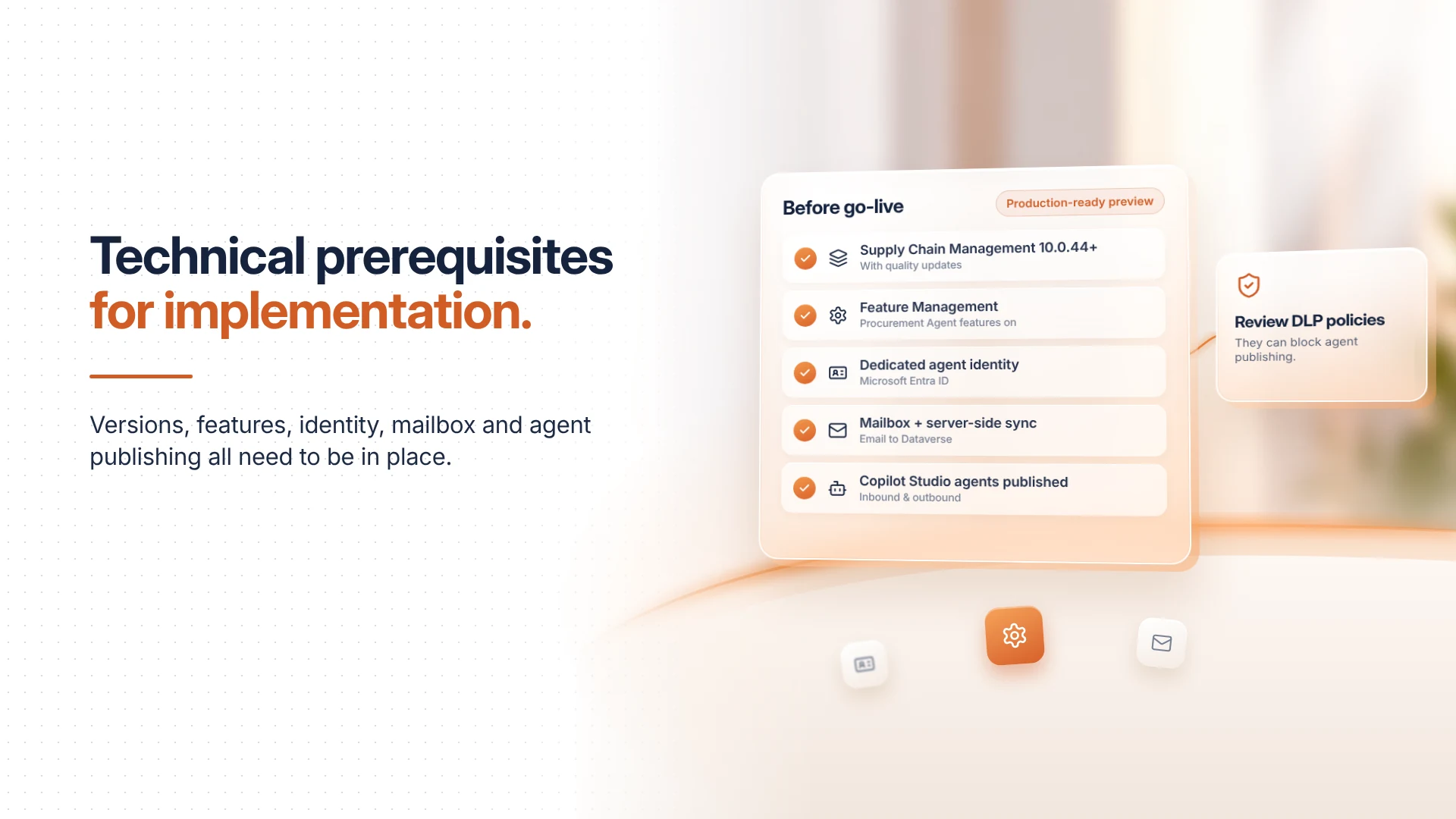
Microsoft's current setup documentation specifies Dynamics 365 Supply Chain Management version 10.0.44 or later, with all available quality updates. The environment must also have Copilot for finance and operations apps version 1.0.03048.2 or later and Copilot in Microsoft Dynamics 365 Supply Chain Management version 1.1.03510.1 or later.
The relevant capabilities must be enabled through Feature Management, including Immersive Home, Agent management and Procurement Agent - Supplier Communications. Organisations planning to enable automatic follow-up emails must also activate the corresponding optional feature separately.
Microsoft currently identifies the Supplier Communications Agent as a production-ready preview. This distinction is important for organisations evaluating the feature for deployment, as production-ready preview capabilities remain subject to Microsoft's supplemental terms and may have documentation or functionality changes.
6.2 Microsoft Entra ID and security configuration
The agent requires a dedicated identity to connect with the services it uses. This identity is configured through Microsoft Entra ID and must have the appropriate permissions to interact with Dynamics 365 Supply Chain Management, Microsoft Dataverse, Microsoft Copilot Studio and Exchange.
The deployment process includes assigning the required product licenses and security roles to the agent identity. Users responsible for managing agent configurations and reviewing agent results also require appropriate permissions in Dataverse and Supply Chain Management.
Organisations should avoid using an ordinary employee account as a substitute for a properly configured agent identity. A dedicated identity makes access management, permission control and ongoing maintenance easier to govern.
6.3 Mailbox integration and email synchronization
Supplier communication depends on reliable email connectivity. The organisation must configure at least one mailbox and establish server-side synchronization between the email server and Dataverse.
Both shared and private mailboxes are supported, subject to their respective ownership and access requirements. Shared mailboxes can be associated with a team in the Power Platform environment, while private mailboxes are associated with individual users.
For automatic follow-up emails, additional email configuration is required, including the Microsoft Graph email provider and relevant application credentials.
This is also where supplier contact master data becomes important. The organisation must ensure that the configured mailboxes can receive and process supplier correspondence and that the vendor records contain valid communication details. Microsoft specifically recommends disabling automatic follow-up emails in sandbox environments where purchase order information may be outdated or vendor email addresses may be missing.
6.4 Copilot Studio agent availability
The setup process also requires the relevant Microsoft Copilot Studio agents to be published. These include Supplier communications Agent - inbound and Supplier Communications Agent - outbound.
The deployment wizard generally handles the publishing process automatically. However, data loss prevention (DLP) policies can affect agent publishing and connector availability. Administrators should therefore review the relevant Power Platform environment policies and confirm that the required connections are permitted before deployment.
7. A practical approach to preparing Dynamics 365 for supplier communication automation
Implementing AI in procurement should not begin with enabling every available feature. It should begin with identifying where existing procurement processes are inconsistent.
The first step is to review supplier master data, including vendor account numbers, contact information, registered addresses, vendor status and legal entity relationships. Duplicate records and outdated communication details should be addressed before the agent is connected to procurement mailboxes.
The next step is to examine purchase order structures and transaction practices. Purchase order numbering, line-level product information, confirmation status and approval workflows should be consistent. Procurement teams should also establish how supplier-requested changes are reviewed and applied, particularly when they affect prices, quantities or delivery commitments.
Item and delivery configurations require similar attention. Purchasing units, unit conversions, vendor lead times, transit assumptions and warehouse information should reflect actual procurement arrangements. These details provide the transaction context required to interpret supplier communications accurately.
Once the data foundation is reviewed, administrators can configure the required identities, security roles, mailboxes, server-side synchronization and Copilot Studio connections. The agent can then be tested using representative supplier communications, including purchase order confirmations, quantity revisions, price requests and delivery delays.
A controlled rollout is preferable to enabling automatic email sending immediately. Procurement teams can initially review generated drafts and proposed changes, assess how accurately the agent identifies purchase orders and extracts supplier requests, and investigate recurring exceptions.
As confidence improves, organisations can evaluate automatic follow-ups for suitable scenarios while retaining appropriate approval controls for commercial and operational changes.
8. What supplier communication automation means for procurement teams
The value of the Supplier Communications Agent extends beyond reducing the number of emails procurement professionals need to write. It changes how purchasing teams identify and respond to supplier-related exceptions.
Instead of spending time checking which vendors have not responded, buyers can review purchase orders that require attention. Instead of manually comparing every supplier email against an existing order, they can review the changes identified by the agent.
When Impact Analysis is enabled, teams can also evaluate the potential consequences of delivery and quantity changes for inventory, production and customer commitments. This creates a more informed approach to managing supplier-related exceptions.
However, these improvements depend on the quality of the information connecting suppliers, purchase orders and operational processes.
A supplier communication agent cannot compensate for a vendor account containing incorrect contact details. It cannot reliably resolve a purchasing-unit conversion that has been configured incorrectly. Nor can it make an unapproved commercial change acceptable simply by extracting it accurately.
This is why master data management should be treated as an implementation priority rather than a post-deployment clean-up activity.
Prepare the data before automating the communication
The Supplier Communications Agent in Dynamics 365 Supply Chain Management offers procurement teams a practical way to reduce repetitive supplier correspondence and improve visibility into purchase order confirmations and changes.
Its capabilities become particularly useful when supplier communication is connected to accurate vendor records, consistent purchasing information and well-defined approval processes.
For organisations planning to introduce AI into procurement, the first step should not be to automate every supplier interaction. It should be to understand how supplier information is maintained, how purchase orders are structured and how changes move through the business.
The effectiveness of supplier communication automation depends not only on how well AI understands an email, but also on how reliably the ERP system understands the business information behind it.
A well-maintained master data foundation gives Dynamics 365 the context required to support more informed procurement decisions, more consistent supplier interactions and better control over supply chain commitments.